Browser extension

Sweet TEA.
The Texas Education Agency's web apps do the job. They just make you work for it — six-digit district numbers typed from memory, a district picker that loads the wrong district, a session that logs you out mid-thought. Sweet TEA fixes those on the page, in your browser, without touching TEA's systems.
- Product
- Sweet TEA — browser extension
- Works with
- TEA web apps (TEAL, eGrants, EMAT, Grant Opportunities)
- Stores data in
- Your browser only
- Publisher
- Applause Consulting
What it fixes
Sweet TEA runs only on tea.state.tx.us and
tea.texas.gov. On any other site it does nothing at all.
On TEA pages it adds four things:
- eGrants district search
- Type a district name or CDN — no more looking up six-digit numbers
- EMAT district switcher
- Loads the district you asked for on the first try
- Copy Link to Grant
- One click copies a shareable link to the grant you are reading
- Stay logged in
- Opt-in, time-limited hold on the TEAL session while you work elsewhere
Find a district by name
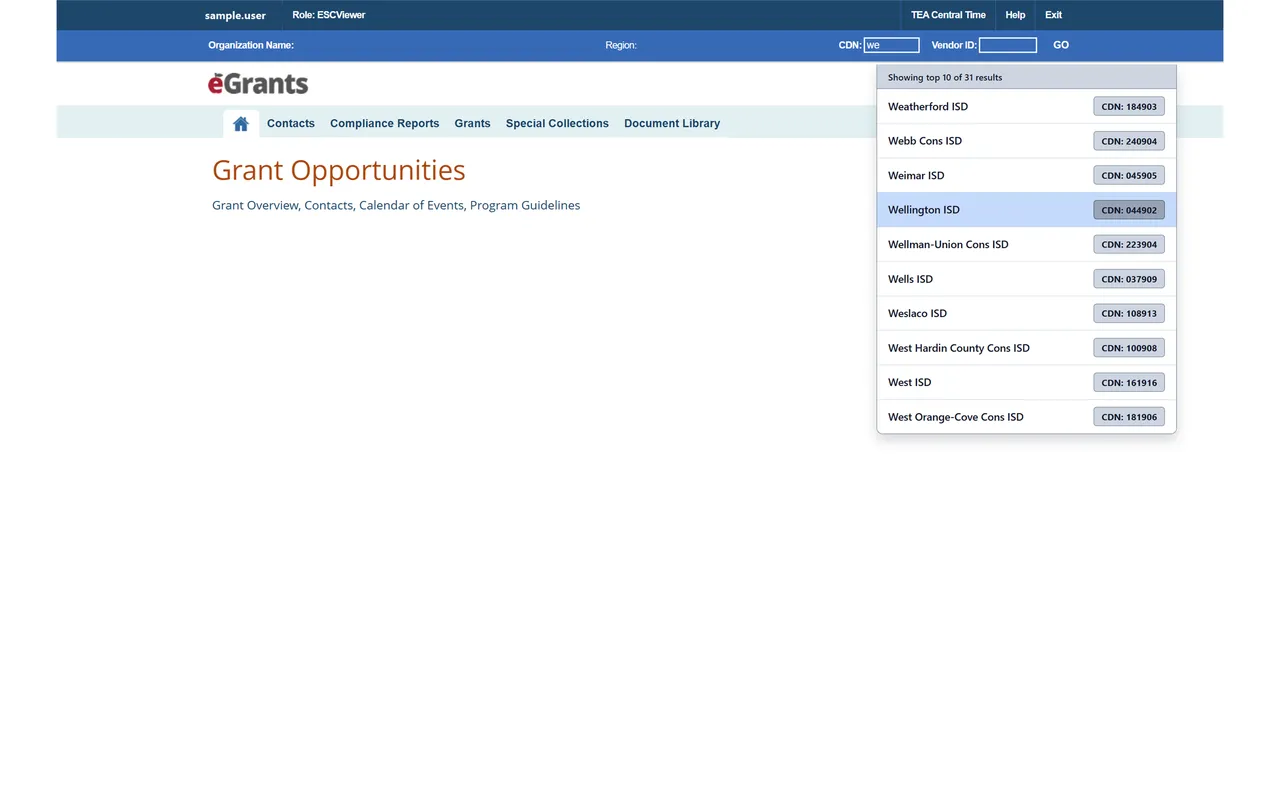
eGrants asks for a county-district number. Sweet TEA turns that box into a search: start typing Victoria or 235902, pick the match, and the field fills itself. The list covers every Texas district and charter, and it ships inside the extension — nothing is looked up online.
A district switcher that works
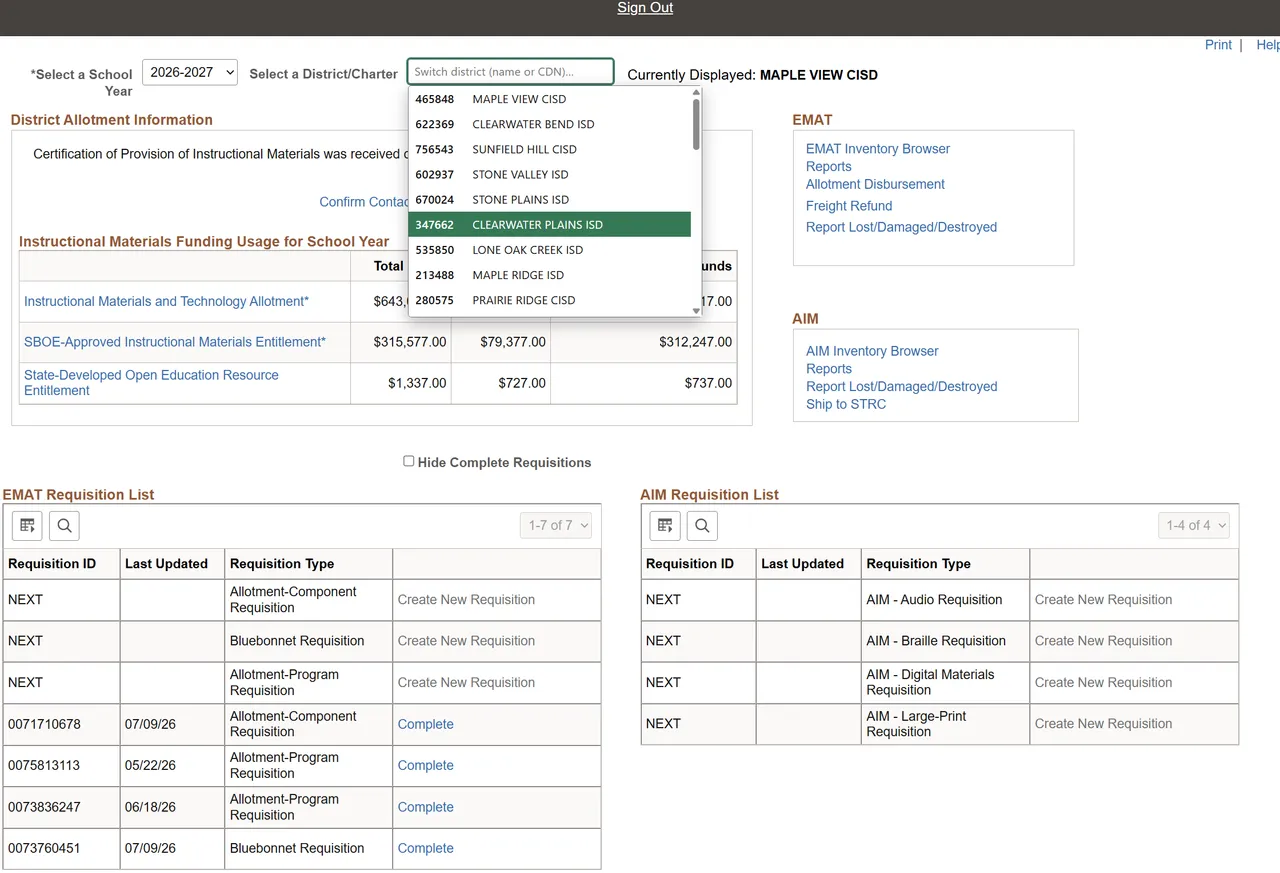
EMAT has a long-standing bug: choose a different district on the District Start Page and the page reloads showing the district you had before. Getting where you meant to go means clicking back through the app and clearing a stale name off the search screen.
Sweet TEA replaces the District/Charter box with a picker that loads the right district the first time, and labels the district you are looking at as Currently Displayed, which EMAT leaves unmarked. The list holds exactly the districts your account may open — a service-center user sees their region, a district user sees their district — because Sweet TEA asks EMAT for it rather than guessing.
Copy a link to any grant
Grant Opportunities pages have no stable address to share. A Copy Link to Grant button beside the grant title looks the grant up in a maintained list and puts a working link on your clipboard, ready to paste into an email or a district newsletter.
Stay logged in — when you ask it to
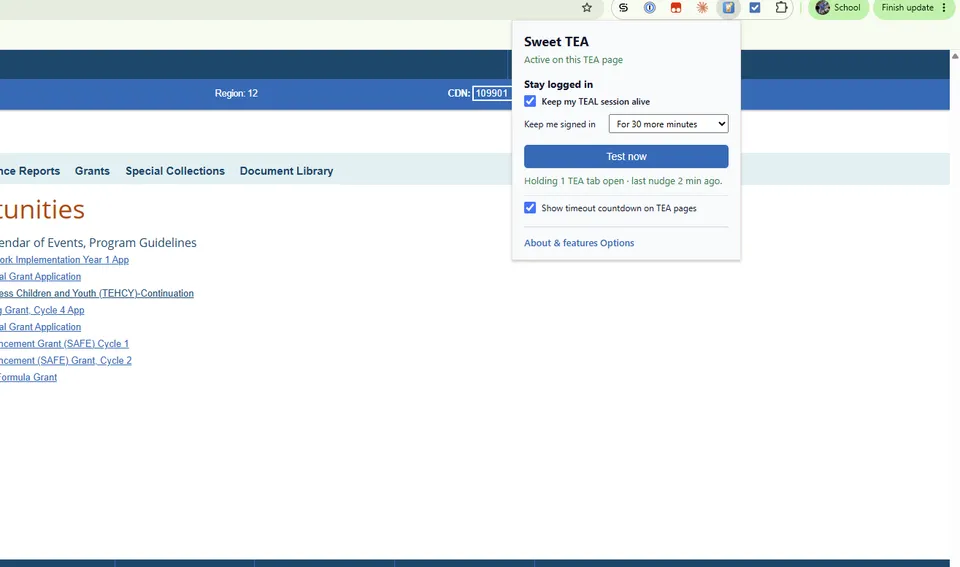
TEAL signs you out after nineteen idle minutes, and every app you had open goes with it. Sweet TEA can hold the session open while you are reading a PDF or filling in a spreadsheet in another window. It is off by default, and when you turn it on you choose how long it lasts:
- 30 more minutes
- Enough for a meeting
- 2 more hours
- Enough for a long working session
- Until you close your TEA tabs
- Stops the moment the last TEA tab is gone
There is no "forever" setting. If you genuinely walk away, the hold expires and TEAL's normal timeout takes over, so an unattended machine is not left signed in. This is less secure than TEA's default, and the extension says so the first time you switch it on and asks you to confirm. Don't use it on a shared computer, and close your TEA tabs when you are done.
An optional countdown badge in the corner of the page shows the two clocks — when TEAL would log you out, and when Sweet TEA will stop holding the door — so nothing is a surprise.
Nothing leaves your browser
Sweet TEA has no server. Your settings and a cached copy of the grant list live in your browser's extension storage and nowhere else. It never reads your TEA password, never sends page content anywhere, and carries no analytics. Full detail in the privacy policy.
Getting it
Install it from the store, then open any TEA app. The toolbar icon shows whether the current tab is a TEA page and holds the Stay logged in switch; its About page lists every feature with a link to the TEA screen where it applies.
Add to Chrome Also runs in Firefox
Applause Consulting is not affiliated with, or endorsed by, the Texas Education Agency.
Sweet TEA is built and maintained by Applause Consulting for the people who live in these apps every day. If a TEA screen is costing your team time and you'd like it fixed — or you want something similar for a system that isn't TEA — get in touch.
Add to Chrome Read the case study Ask about Sweet TEA Privacy policy
Not affiliated with, or endorsed by, the Texas Education Agency. TEA, TEAL, eGrants and EMAT are names of Texas Education Agency systems.