Chrome extension
Audit Helper.
An auditor's request list tells you what they need. It does not tell you which person on your team is responsible for each item, or when that item is actually due internally. Audit Helper adds that missing information to the CCH Engagement Organizer—and the auditor never sees any of it.
- Product
- Audit Helper — Chrome extension
- Works with
- CCH Axcess Engagement Organizer
- Stores data in
- A Google Sheet you own
- Needs
- A one-time setup, about ten minutes
- Publisher
- Applause Consulting
How it works
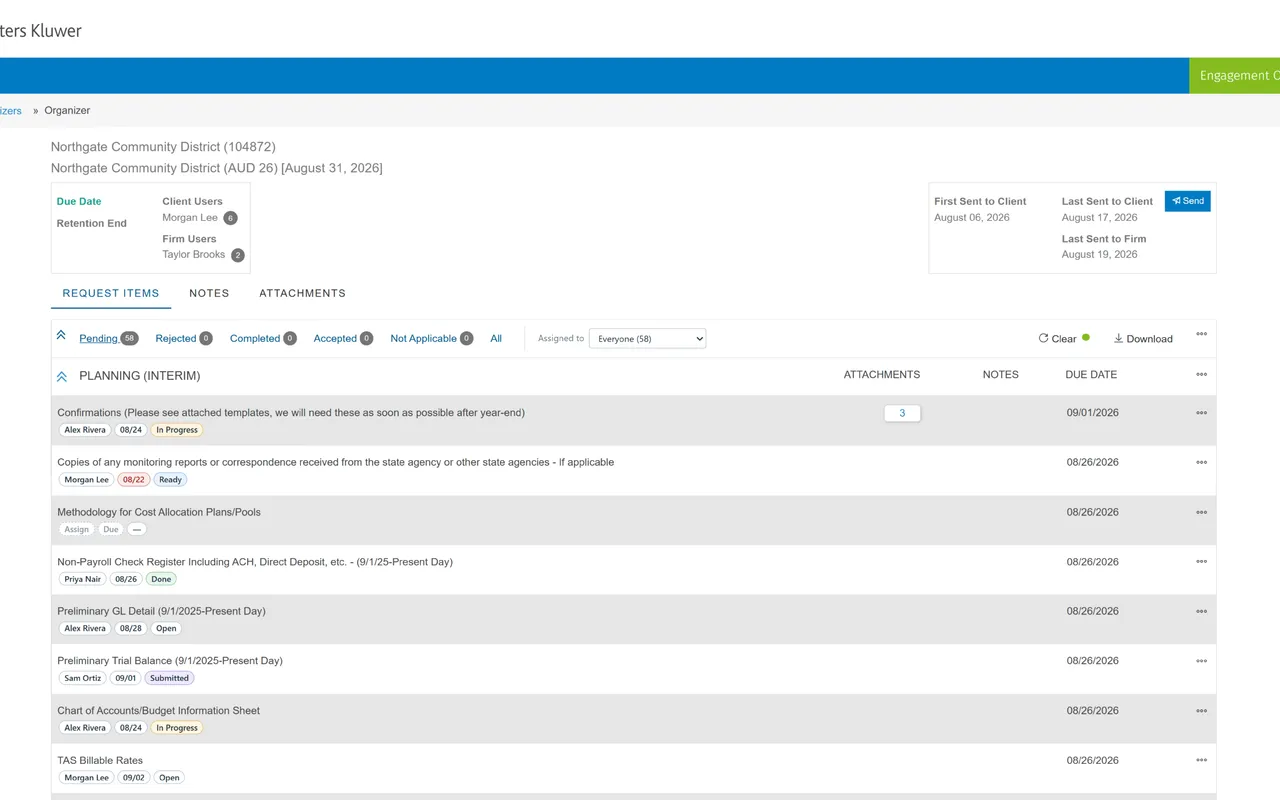
Every request item gets three chips: owner, internal due date, and status. They sit directly under the auditor's description, and you can click any chip to change its value. All of this data lives in a Google Sheet your team shares, and reminder emails go out automatically. (There's a one-time setup before the chips appear.)
What it doesn't do
Audit Helper never writes anything to CCH. It reads the request list that has already loaded on the page and displays its own information on top of it. Nothing is sent to the auditor. Nothing in the engagement is changed. No data is sent to Applause Consulting, and there is no publisher backend. (Our privacy policy has the full details.)
Finding your items
You can filter the list to see just your own items. There's an Assigned to dropdown next to the organizer's Pending and Completed tabs, and it's a separate control so you can combine it with those tabs. Choosing Pending and My items together shows exactly what you still need to finish—something a sixth tab couldn't have offered.
- Everyone
- Everything — the default
- My items
- Just yours
- Unassigned
- Nobody has picked it up yet
- A teammate
- Just theirs
Each option in the dropdown shows a count, and empty sections are collapsed automatically. So when you choose My items, you get a short list without scrolling through a long run of empty section headers.
Keeping status in sync
Statuses update automatically to match CCH. The statuses, in order, are Open, In Progress, Ready, Submitted and Done. Reminders stop once an item reaches Submitted or Done. When an item is marked Completed in CCH, the tracker status updates to match. If the auditor rejects an item, its status returns to In Progress and reminders start again, because it needs rework. And if you set a status by hand, it's kept until the item's state in CCH changes.
The emails
- You’ve been assigned something
- Within 15 minutes, 8am–5pm on weekdays; otherwise the next weekday morning
- Due soon
- 7am on a weekday, three days before your internal due date
- Overdue
- 7am every weekday, until it’s done
- Weekly digest
- Monday 7am — everything still open, per person
- Daily digest
- 7am on weekdays — what moved since the last one, what’s overdue
Audit Helper sends a digest email that covers everyone on the engagement. It’s not for the person who just needs to know whether their own item is still open—it’s for the person running the show, who needs to know what changed yesterday, what’s overdue, how many items each person still has open, and what’s sitting around with no owner at all.
You’ll decide who gets it and when on the Settings tab of your tracker sheet. No emails go out on Saturday or Sunday, but anything that falls due on a weekend is included first thing Monday morning.
When someone assigns an item, a small notice in the corner of the screen confirms when the email will be sent. If it can’t go out for some reason, the tracker sheet makes a note of why. Usually it’s a mistyped email address.
Those emails are sent by a Google Apps Script that runs in your own Google account and works on your own sheet.
The toolbar button
Once it’s set up, clicking the Audit Helper icon in Chrome’s toolbar opens your tracker sheet or the connection settings. If you don’t see the icon there, you can pin it from Chrome’s puzzle-piece menu.
Setting it up
Audit Helper doesn’t do anything until it’s connected to a tracker sheet, so installing the extension is the second step, not the first. You need client access to a CCH Axcess Engagement Organizer, and a Google account.
One person does the setup once: create a Google Sheet, paste in the companion script, deploy it as a web app, and give two values to the rest of the team. Everyone else installs the extension and pastes in the two values. The setup guide covers each step, plus updating and troubleshooting.
Read the setup guide Add to Chrome ~10 minutes, one-time
Applause Consulting is not affiliated with, or endorsed by, Wolters Kluwer or CCH.
Applause Consulting builds and maintains Audit Helper. If you’d like us to set it up for your engagement, or if you want a similar tool for a system other than CCH, let us know.
Add to Chrome Setup instructions Ask about Audit Helper Privacy policy
Not affiliated with, or endorsed by, Wolters Kluwer or CCH. Why we built it